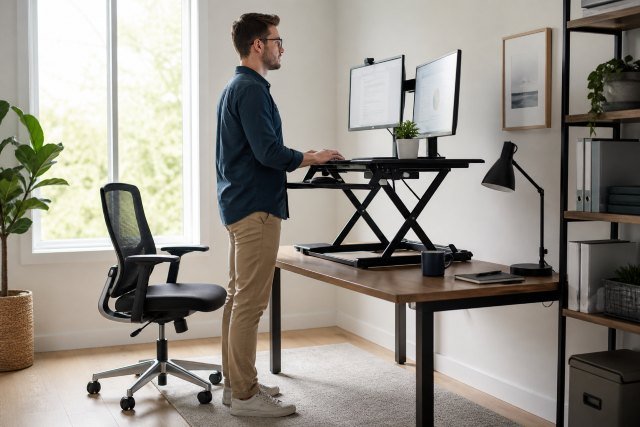
What Is A Riser Desk and why are so many home-office workers, students, gamers, and professionals using one? A riser desk is a height-adjustable platform that sits on top of your existing desk and lets you raise your monitor, keyboard, laptop, or workspace so you can work while standing. Instead of replacing your entire desk, a riser desk converts a regular sitting desk into a sit-stand workstation.
- What Is A Riser Desk?
- How Does a Riser Desk Work?
- Riser Desk vs Standing Desk: What Is the Difference?
- Why Do People Use a Riser Desk?
- Main Benefits of a Riser Desk
- Better Sitting and Standing Balance
- Improved Posture Awareness
- Less Neck and Shoulder Discomfort
- More Energy During Long Workdays
- Affordable Upgrade for Home Offices
- Are Riser Desks Actually Good for Health?
- How to Use a Riser Desk Correctly
- Best Sitting and Standing Routine for a Riser Desk
- Who Should Use a Riser Desk?
- Who May Not Need a Riser Desk?
- Types of Riser Desks
- How to Choose the Best Riser Desk
- Common Mistakes to Avoid
- Real-World Example: How a Riser Desk Helps
- Riser Desk for Small Spaces
- Riser Desk for Students
- Riser Desk for Remote Workers
- Is a Riser Desk Better Than a Normal Desk?
- FAQs About Riser Desks
- What Is A Riser Desk in simple words?
- Is a riser desk the same as a standing desk?
- Can a riser desk help with back pain?
- How long should I stand at a riser desk?
- Do I need an anti-fatigue mat?
- Is a riser desk good for laptop users?
- Are riser desks worth it?
- Conclusion: What Is A Riser Desk and Should You Buy One?
The simple idea is this: you should not sit all day, and you should not stand all day either. A good riser desk helps you switch between sitting and standing, improve your posture, reduce long static work sessions, and create a more active work routine.
Health organizations and workplace ergonomics sources often warn against long periods of sitting or awkward posture. The Mayo Clinic notes that prolonged sitting has been linked with several health concerns, including obesity, high blood pressure, abnormal cholesterol levels, and increased cardiovascular risk. NIOSH also explains that office workers should avoid overreaching, standing or sitting too long, and using awkward postures.
That does not mean a riser desk is magic. It is a tool. When used correctly, it can make your workspace more flexible, comfortable, and movement-friendly.
What Is A Riser Desk?
A riser desk, also called a desk riser, standing desk converter, sit-stand desk converter, or desktop riser, is a raised platform placed on an existing desk. It usually holds your monitor and keyboard, and many models move up and down so you can alternate between sitting and standing.
Unlike a full standing desk, a riser desk does not replace your current desk. It sits on top of it. That makes it popular for people who rent, work in shared offices, have limited space, or want a cheaper way to try standing while working.
A basic riser desk may look like a simple monitor stand. A more advanced one may include spring-assisted lifting, a keyboard tray, dual monitor space, cable management, and several height settings.
In short, a riser desk helps raise your work surface to a more ergonomic height when standing.
How Does a Riser Desk Work?
Most riser desks use a lifting mechanism. Some move straight up and down, while others move slightly forward as they rise. The user places the riser on a normal desk, puts the monitor or laptop on top, and adjusts the height based on sitting or standing position.
When sitting, the riser stays low. When standing, you lift it to a height where your screen is near eye level and your keyboard allows your elbows to rest comfortably near a 90-degree angle.
Some riser desks are manual. You lift them by hand using side handles or levers. Others use gas springs to make lifting easier. Premium models may be electric, although electric riser desks are less common than electric full standing desks.
The goal is not just to stand. The real goal is to change posture throughout the day.
Riser Desk vs Standing Desk: What Is the Difference?
A riser desk is placed on top of your existing desk. A standing desk is usually a full desk with legs that adjust in height.
A riser desk is often cheaper, easier to install, and more portable. It is a smart option if your current desk is still useful. A full standing desk is better if you want a cleaner setup, larger work surface, stronger weight capacity, and smoother height adjustment.
Here is the simple difference:
A riser desk upgrades your current desk.
A standing desk replaces your current desk.
Both can help you sit and stand during the workday, but the best choice depends on your budget, space, and work style.
Why Do People Use a Riser Desk?
People use riser desks because modern work often keeps them sitting for hours. Many office workers, freelancers, students, designers, coders, writers, and remote employees spend most of the day in front of a screen.
That can create problems when the workstation is poorly arranged. Common issues include neck strain, rounded shoulders, stiff hips, lower back discomfort, wrist pressure, and low energy during long work sessions.
A riser desk gives users a practical way to adjust their position without buying a completely new desk. It also encourages small posture changes, which can be more helpful than staying frozen in one “perfect” position.
The CDC’s Take-a-Stand Project found that a sit-stand device reduced sitting time and was associated with improvements such as reduced upper back and neck pain and better mood states among workers. A CDC scoping review also examined sit-stand desks across several areas, including sitting behavior, discomfort, posture, psychological effects, and work performance.
The main benefit is not that standing alone solves everything. The benefit is having more freedom to move.
Main Benefits of a Riser Desk
Better Sitting and Standing Balance
A riser desk helps you avoid staying in one position for too long. Sitting all day can feel comfortable at first, but after several hours, the body often becomes stiff and tired.
Standing all day is not ideal either. Long standing can also cause discomfort in the feet, legs, and lower back. That is why the best approach is usually a sit-stand routine, not a stand-all-day routine.
A riser desk makes that routine easier because you can adjust your workstation in seconds.
Improved Posture Awareness
A riser desk can help you become more aware of your posture. When your monitor is too low, your head tilts forward. When your keyboard is too high, your shoulders rise. When your mouse is too far away, you may overreach.
With a properly adjusted riser desk, your screen can sit closer to eye level, and your arms can rest more naturally while typing. OSHA’s computer workstation guidance recommends height-adjustable desks and proper leg clearance to support safer workstation design.
Good posture is not about sitting stiff like a statue. It is about reducing unnecessary strain.
Less Neck and Shoulder Discomfort
Many people work with laptops placed flat on a desk. This often forces the neck downward. Over time, that position can lead to neck tightness, shoulder tension, and upper back discomfort.
A riser desk can raise the screen, especially when paired with an external keyboard and mouse. This setup helps keep the head more neutral and reduces the need to bend forward.
For laptop users, this is one of the biggest reasons to consider a riser desk.
More Energy During Long Workdays
Standing for part of the day may help some people feel more alert. It can also break the mental heaviness that comes from sitting for hours without movement.
Many users say they prefer standing during calls, short tasks, brainstorming, or afternoon work blocks. Sitting may still be better for deep writing, detailed design, or long concentration sessions.
The best routine is personal. A riser desk simply gives you the option to choose.
Affordable Upgrade for Home Offices
A full standing desk can be expensive and may require rearranging your room. A riser desk is often more affordable and easier to set up.
For people working from home, this matters. You may already have a good desk, but it may not support standing. A riser desk lets you improve your setup without replacing everything.
It is also useful for renters, students, and people with small apartments.
Are Riser Desks Actually Good for Health?
A riser desk may support healthier work habits, but it should not be treated as a cure for health problems. Research on standing desks and sit-stand workstations suggests they can reduce sitting time and may improve comfort for some users, but standing alone is not the same as exercise.
Harvard Health has noted that standing desks are unlikely to be a major weight-loss solution, though standing and moving more may still have benefits such as reducing shoulder or back discomfort for some people.
The most balanced advice is this: use a riser desk to reduce long sitting sessions, but also walk, stretch, move, and exercise regularly.
A riser desk helps you change posture. Movement helps your body function better.
How to Use a Riser Desk Correctly
Using a riser desk incorrectly can create new problems. If the monitor is too high, your neck may tilt upward. If the keyboard tray is too low, your wrists may bend awkwardly. If you stand too long, your legs and feet may become tired.
Start by adjusting your monitor so the top of the screen is around eye level. Your eyes should naturally look slightly downward toward the center of the screen.
Keep your elbows close to your body when typing. Your shoulders should feel relaxed, not raised. Your wrists should stay neutral instead of bent sharply up or down.
Place your mouse close to your keyboard. If you constantly reach forward or sideways, your shoulder may become irritated.
Wear comfortable shoes or use an anti-fatigue mat if you stand for longer periods. Avoid locking your knees while standing. Shift your weight gently and take small walking breaks.
Best Sitting and Standing Routine for a Riser Desk
There is no perfect rule for everyone, but beginners should avoid standing for too long at first. Start with short standing sessions of 10 to 20 minutes. Then sit again. As your body adjusts, you can increase standing time gradually.
A practical routine might look like this:
Sit for focused work.
Stand during video calls.
Sit again for writing or detailed tasks.
Stand after lunch to avoid afternoon sluggishness.
Walk for a few minutes every hour.
The key is variation. Your body usually responds better to frequent position changes than to one long stretch of sitting or standing.
Who Should Use a Riser Desk?
A riser desk can be useful for remote workers, office employees, students, freelancers, writers, editors, designers, programmers, customer support agents, accountants, and anyone who spends several hours at a desk.
It is especially useful if you already like your current desk but want standing flexibility. It is also helpful if you share a workspace, because a riser desk can be moved more easily than a full standing desk.
Laptop users may benefit if they use the riser to raise the screen and add an external keyboard and mouse. Without those accessories, a laptop riser can still leave the keyboard too high or the screen too low.
Who May Not Need a Riser Desk?
A riser desk is not necessary for everyone. If you already take regular movement breaks, have an ergonomic chair, use a properly adjusted monitor, and feel comfortable while working, you may not need one.
People with certain medical conditions, balance concerns, foot pain, varicose vein problems, or back issues should be careful with long standing sessions. A riser desk can still be useful, but it should be used gently and adjusted to personal comfort.
Standing more is not automatically better. Working better means changing posture, staying comfortable, and moving regularly.
Types of Riser Desks
Manual Riser Desk
A manual riser desk is adjusted by hand. It is usually cheaper and simple to use. Some models have fixed height levels, while others use a spring mechanism.
This type is good for people who want a budget-friendly option.
Gas-Spring Riser Desk
A gas-spring riser desk uses assisted lifting. It feels smoother and requires less effort. This is common in mid-range standing desk converters.
It is a good option if you switch between sitting and standing several times a day.
Electric Riser Desk
An electric riser desk moves with a button. It is convenient but usually more expensive. It may also require power access and has more parts that could fail over time.
This option is best for people who want maximum convenience without replacing the full desk.
Monitor Riser
A monitor riser is usually a fixed stand that raises the screen. It may not support standing height. It is useful for posture while sitting but is not the same as a full sit-stand riser desk.
Before buying, check whether the product is adjustable enough for standing work.
How to Choose the Best Riser Desk
Choosing the right riser desk depends on your work setup. Do not buy based only on looks. Focus on size, stability, height range, keyboard comfort, and weight capacity.
First, measure your existing desk. Make sure the riser fits without hanging over the edges. Then check the maximum height. A tall person may need a higher riser than a shorter person.
Look at the platform size. If you use two monitors, choose a wider model. If you use a laptop, make sure there is enough space for an external keyboard and mouse.
Stability is important. A shaky riser can make typing annoying and may feel unsafe with expensive monitors.
Also check how the riser moves. Some models lift straight up, while others move forward. If your desk is shallow, forward-moving models may feel crowded.
Common Mistakes to Avoid
One common mistake is standing all day immediately. This can cause foot and leg fatigue. Start slowly.
Another mistake is using a laptop alone on the riser. This often makes either the screen or keyboard position awkward. A separate keyboard and mouse usually make the setup much better.
Many users also forget monitor distance. Your screen should not be too close to your face. Keep a comfortable viewing distance so your eyes are not strained.
Another mistake is ignoring the chair. A riser desk does not fix a bad sitting setup. You still need a supportive chair, proper desk height, and good sitting posture.
Finally, do not confuse standing with movement. Standing still for hours is still static. Take walking breaks.
Real-World Example: How a Riser Desk Helps
Imagine a freelance writer who works six hours a day at a small desk. At first, she sits the whole time. By mid-afternoon, her shoulders feel tight, her lower back aches, and her energy drops.
She adds a riser desk. In the morning, she sits while planning her article. During research calls, she raises the desk and stands. After lunch, she stands for 20 minutes while editing. Every hour, she walks for two minutes.
The riser desk does not do the work for her. It simply makes movement easier. After a few weeks, her workday feels less stiff because she is no longer locked into one position.
That is the real value of a riser desk.
Riser Desk for Small Spaces
A riser desk can be a smart choice for small rooms because it uses your existing furniture. You do not need to remove your current desk or buy a large electric standing desk.
For small spaces, choose a compact model with a stable base. Avoid oversized converters if your desk is narrow. Also look for cable management features so your workspace stays clean.
A clutter-free setup matters. When the riser goes up and down, loose cables can get pulled or tangled.
Riser Desk for Students
Students often study at basic desks, dining tables, or shared spaces. A riser desk can help create a more flexible study area.
Standing may be useful during revision, reading notes, watching lectures, or reviewing flashcards. Sitting may be better for long writing assignments.
For students, budget and portability are usually important. A lightweight adjustable riser or laptop stand with an external keyboard can be a practical setup.
Riser Desk for Remote Workers
Remote workers may spend even more time at a desk than office employees because there is no commute, meeting room walk, or casual office movement.
A riser desk can help create small posture changes throughout the day. It can also make video calls feel more active and natural.
For remote work, a stable riser with enough room for a monitor, keyboard, mouse, notebook, and coffee mug may be worth the investment.
Is a Riser Desk Better Than a Normal Desk?
A riser desk is better than a normal desk if you want sit-stand flexibility without replacing your furniture. A normal desk can still be ergonomic if it is set up correctly, but it usually does not allow standing work.
A riser desk gives you more options. That is its biggest advantage.
However, a riser desk is not automatically better if it is too small, unstable, poorly adjusted, or uncomfortable. The best desk is the one that supports your body, your work, and your daily habits.
FAQs About Riser Desks
What Is A Riser Desk in simple words?
A riser desk is an adjustable platform that sits on top of a regular desk and raises your monitor, laptop, keyboard, or work surface so you can work while standing.
Is a riser desk the same as a standing desk?
No. A riser desk sits on your existing desk. A standing desk is usually a full desk that adjusts in height.
Can a riser desk help with back pain?
It may help some people by reducing long sitting sessions and improving screen and keyboard height. However, back pain can have many causes, so a riser desk should be used with proper posture, movement breaks, and medical advice if pain is serious or ongoing.
How long should I stand at a riser desk?
Start with short sessions, such as 10 to 20 minutes, then sit again. The goal is to alternate between sitting, standing, and walking rather than standing all day.
Do I need an anti-fatigue mat?
An anti-fatigue mat can help if you stand for longer periods. It may reduce foot discomfort and make standing more comfortable.
Is a riser desk good for laptop users?
Yes, but it works best with an external keyboard and mouse. This allows you to raise the laptop screen while keeping your hands in a comfortable typing position.
Are riser desks worth it?
A riser desk is worth it if you want a simple, affordable way to create a sit-stand workstation. It is especially useful for people who already have a desk they like.
Conclusion: What Is A Riser Desk and Should You Buy One?
What Is A Riser Desk? It is a practical sit-stand desk converter that helps you raise your workspace, switch between sitting and standing, and build a more flexible work routine.
It is not a miracle health device, and it should not replace regular movement or exercise. But when used correctly, a riser desk can improve posture awareness, reduce long static sitting, support better workstation ergonomics, and make your workday feel more active.
If you spend hours at a desk and want a budget-friendly upgrade, a riser desk is a smart place to start. Choose one that fits your desk, supports your equipment, adjusts to your height, and feels stable while typing.